

A single customer service hire costs $45,000-55,000 per year once you add benefits, training, and overhead. That's before they answer their first call. And when your ticket volume doubles next quarter, the math says you need to double your team too.
But you don't. Not anymore. Whether you're running a Shopify store getting 3x the calls you got last year or managing a growing ecommerce brand, there are proven strategies to handle more volume without adding staff:
- AI phone agents: answer calls 24/7 at $0.19/minute
- Self-service tools: deflect 40-60% of tickets automatically
- Smart automation: route, tag, and resolve without human touch
Here are eight strategies that actually work, with real numbers behind each one.
Why scaling without hiring matters more than ever
Customer service costs have a scaling problem. Every new hire adds salary, benefits, training time, management overhead, and turnover risk. Those costs grow linearly with volume.
For ecommerce stores, the volume is unpredictable too. Flash sales, seasonal spikes, viral TikTok moments. You can't hire for peak demand and you can't afford to miss calls during it either.
The economics are shifting fast:
- 30-50% productivity increase: AI boosts customer service team output, according to BCG
- $0.50-$0.70 per AI interaction vs $6-$8 for a human agent (roughly 12x cheaper)
- $80 billion in contact center labor savings projected by end of 2026, per Gartner
Stores that figure this out early don't just save money. They get faster response times, 24/7 coverage, and consistent service quality across every channel.
The real cost of hiring vs. automating
Before picking a strategy, look at what each option actually costs:
| Factor | Hiring a CS agent | AI phone agent ([Ringly.io](https://www.ringly.io)) | Chatbot | Self-service KB |
|---|---|---|---|---|
| Annual cost | $45,000-55,000 | $1,188-4,188/yr | $300-1,200/yr | $0-600/yr |
| Setup time | 2-4 weeks | 3 minutes | 1-3 days | 1-2 weeks |
| Coverage | 8-10 hrs/day | 24/7 | 24/7 | 24/7 |
| Languages | 1-2 | 40 | 10-30 | Depends on content |
| Scales with volume | No (linear cost) | Yes (per-minute) | Yes | Yes |
| Handles phone calls | Yes | Yes | No | No |
| Handles complex issues | Yes | Escalates to human | Limited | No |
| Resolution rate | 85-95% | 73% | 50-70% | 40-60% deflection |
The gap is significant. A human agent handles 8-10 tickets per hour, while an agent with AI assistance handles 12-15 (a 50-80% productivity boost). A fully automated AI phone agent handles unlimited concurrent calls at $0.19 per minute.
For most ecommerce stores, the right answer isn't "pick one." It's layering multiple strategies based on your volume and channels.
1. Set up an AI phone agent for inbound calls
Phone support is the most expensive channel to staff and the least automated by most ecommerce brands. That's a problem because customers still call when something is urgent, whether it's a missing order, a billing issue, or a return that needs immediate attention.
An AI phone agent answers those calls 24/7, in real time. It pulls up order data, checks shipping status, walks customers through returns, and handles the questions your team answers dozens of times per day.
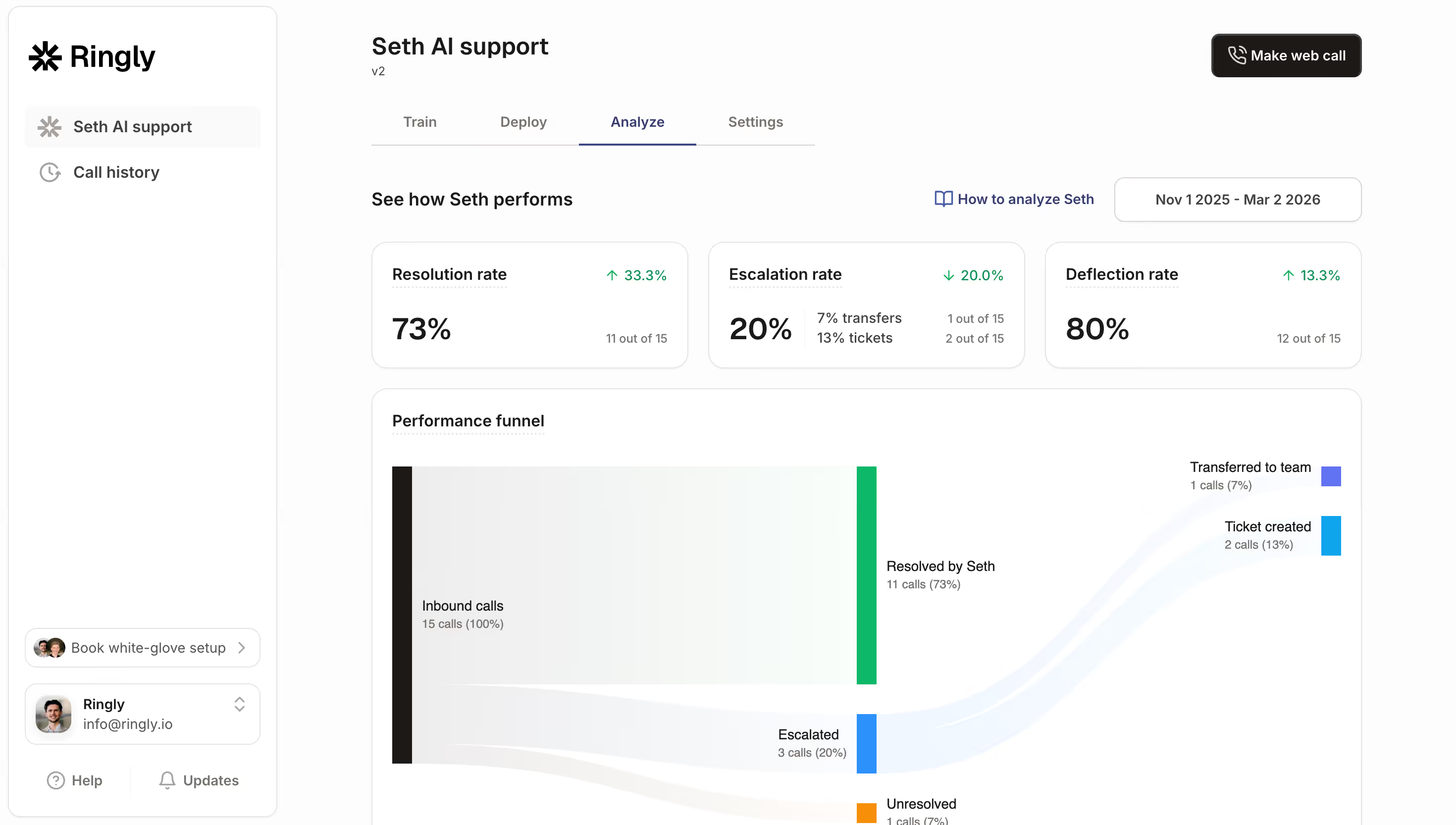
Ringly.io is built specifically for this. Their AI agent, Seth, connects directly to Shopify, looks up orders by phone number or email, and resolves 73% of calls without any human involvement. Setup takes about three minutes (we've timed it, and honestly it's closer to two if you have your Shopify URL ready).
What it handles:
- WISMO calls: "Where is my order?" queries, which make up 30-50% of all support tickets
- Returns and exchanges: walks customers through the process and creates return labels
- Product questions: pulls answers from your knowledge base and product catalog
- Order modifications: cancellations, address changes, add-ons
- Smart escalation: complex or emotional calls get transferred to a human with full context
Pricing starts at $99/month for 250 minutes. Compare that to a single part-time agent at $18-20/hour, and you're looking at 10-20x savings on your phone support costs.
If those savings sound compelling, try Ringly.io free for 14 days and get Seth answering calls in under three minutes.
2. Build a self-service knowledge base
81% of customers try to solve their own problem before reaching out to support. If you don't give them the tools to do that, they'll email, call, or chat every time.
A well-built knowledge base deflects 40-60% of incoming tickets. Mature programs hit 65-75% deflection. The key word is "well-built." A knowledge base with five vague articles and a broken search bar won't help anyone.
Focus on your top 20 ticket types first:
- Shipping and delivery timelines: when will my order arrive?
- Return and refund policies: step-by-step instructions, not legal jargon
- Sizing and fit guides: reduce "does this fit?" inquiries for apparel stores
- Product care and usage: tutorials, storage tips, ingredient lists
- Payment and billing FAQ: accepted methods, failed payment troubleshooting
Self-service costs roughly $0.10 per contact compared to $8-12 for a live agent interaction. That's up to 120x cheaper.
3. Automate order tracking and WISMO responses
"Where is my order?" is the single most common support question in ecommerce. WISMO queries account for 30-50% of all support tickets, and during peak season, that number jumps to 70-80%.
Each WISMO query costs $5-22 to resolve manually. Multiply that by hundreds of tickets per week, and you're spending thousands of dollars just to tell people their package is on the way.
How to fix it:
- Proactive shipping notifications: send SMS and email updates at every stage (shipped, in transit, out for delivery, delivered)
- Real-time tracking pages: embed a branded tracking page on your site so customers can check order status without contacting you
- AI-powered phone handling: when customers do call about WISMO, an AI phone agent looks up the order and provides the update instantly
- Automated email responses: set up rules that detect WISMO emails and auto-reply with tracking links
The goal is simple: give customers their answer before they ask. Stores that implement proactive order tracking typically see a 40-60% drop in WISMO-related tickets within the first month.
4. Deploy a chatbot for your website
AI chatbots handle 50-80% of routine text-based queries, according to recent chatbot statistics. For ecommerce, that means pre-sale product questions, return policies, shipping info, and discount code issues.
The technology has improved dramatically. Modern chatbots pull data from your product catalog, past conversations, and knowledge base. They understand context and follow-up questions instead of just matching keywords.
Where chatbots work well:
- Pre-sale questions: "Is this product vegan?" or "What's the difference between the Pro and Standard?"
- Policy lookups: return windows, shipping costs, warranty info
- Basic troubleshooting: "My discount code isn't working" or "I can't log into my account"
Where they fall short:
- Phone calls: chatbots can't answer the phone (that's where AI voice agents come in)
- Complex or emotional issues: frustrated customers need empathy, not a text bubble
- High-value orders: a $2,000 purchase deserves human attention
Pair a chatbot with an AI phone agent, and you cover both text and voice channels without adding headcount.
5. Create smart escalation workflows
Not everything should be automated. Complex issues, angry customers, and high-value orders need a real person. The trick is knowing when to escalate, and doing it without making the customer repeat everything.
Smart escalation means the AI handles the initial contact, gathers context (order number, issue type, customer history), and then transfers to a human agent with all that information attached.
Good escalation rules:
- Sentiment detection: customer sounds frustrated or angry? Route to a human immediately.
- Order value thresholds: orders over a certain dollar amount get human review
- Issue complexity: AI can't resolve after 2-3 attempts? Escalate with full context.
- VIP customers: repeat buyers or loyalty members get priority human support
Ringly.io's smart call transfer feature does this automatically for phone calls. The AI gathers context, identifies when a call needs human attention, and transfers with a summary so the customer never repeats themselves.
This approach means your human agents spend time on issues that actually need their expertise, not reading order tracking numbers out loud.
6. Use automation workflows for repetitive tasks
Beyond customer-facing AI, there's a whole layer of behind-the-scenes automation that saves your team hours every week. Think about the tasks your support team does repeatedly:
- Auto-tagging and routing: tickets get categorized and sent to the right person (or bot) automatically
- Proactive notifications: shipping delays, back-in-stock alerts, and subscription reminders sent without manual effort
- Template responses: pre-written replies for common scenarios, ready to send with one click
- Post-call actions: AI phone call automations can trigger follow-up emails, update CRM records, or create tickets after every call
Gartner reports that 30% of all service cases are now resolved by AI, with projections hitting 50% by 2027. Much of that comes from workflow automation rather than customer-facing bots.
The benefit compounds over time. Every workflow you automate frees up your team to handle the edge cases and relationship-building that actually require a human touch.
7. Add an FAQ page that actually answers questions
An FAQ page is different from a knowledge base. It's quick, scannable, and focused on the 10-15 questions your team answers most often.
Most ecommerce FAQ pages are terrible (I've reviewed hundreds of them during Shopify store audits). They're either buried in the footer, written in legal language, or haven't been updated since 2022.
What a good FAQ page looks like:
- Grouped by topic: shipping, returns, product care, payment, account issues
- Written in plain language: "You'll get your refund within 5-7 business days" beats "Refunds are processed in accordance with our returns policy timeframe"
- Updated quarterly: pull your top 10 ticket types from the last 90 days and make sure every one has a clear FAQ answer
- Product-specific FAQs: your top-selling products should have their own FAQ sections
This isn't a high-cost investment. It's mostly a content exercise. But it feeds directly into your chatbot and AI phone agent's knowledge base too, making every automated channel smarter.
A strong FAQ page also helps with conversion rate optimization. When customers find answers fast, they're more likely to complete their purchase.
8. Monitor, measure, and iterate
You can't improve what you don't measure. After implementing any of these strategies, track these metrics:
- Resolution rate: what percentage of contacts get resolved without human intervention?
- Cost per ticket: compare before and after automation
- First response time: how quickly do customers get an answer?
- CSAT score: are customers actually satisfied with automated responses?
- Deflection rate: how many tickets never reach a human agent?
Use call analytics and call center analytics software to dig into phone-specific metrics. Listen to call recordings and read chatbot transcripts. Find the gaps where automation fails and either fix the knowledge base or add an escalation rule.
The stores that get the best results from automation aren't the ones that set it up and forget about it. They review their data monthly, update their knowledge base, and refine their escalation rules based on real customer interactions.
How to pick the right strategy for your store
Not every store needs every strategy. A quick framework based on your current support volume:
Small stores (0-100 tickets/month):
- Start with a solid FAQ page and knowledge base
- Add proactive shipping notifications
- Total investment: under $50/month
Growing stores (100-500 tickets/month):
- Everything above, plus a chatbot and an AI phone agent
- Set up WISMO automation
- Total investment: $150-400/month
Scaling stores (500+ tickets/month):
- Full automation stack: AI phone, chatbot, knowledge base, workflow automation
- Smart escalation workflows with human agents for complex cases
- Call center analytics for continuous optimization
- Total investment: $400-1,200/month (still less than one full-time hire)
Even at the highest tier, you're spending a fraction of what a single customer service hire would cost. And you're getting 24/7 coverage in 40 languages.
When automation isn't enough
One honest caveat: automation won't solve everything. If your product is fundamentally confusing, your return policy is a maze, or your shipping is consistently late, no amount of AI will fix the root cause.
Automation works best when the underlying business operations are solid. Fix the product and process issues first, then automate the support for the remaining questions. That's the order that gets the best ROI.
The stores that get this right treat automation as an ongoing process, not a one-time setup. Review your call analytics monthly, update your knowledge base, and iterate.
Frequently asked questions
Can you really scale customer service without hiring anyone?
Yes, but with a caveat. You can automate 50-70% of support interactions using AI phone agents, chatbots, and self-service tools. You'll still want at least one person handling escalated cases and reviewing automation performance.
How much does it cost to automate customer service?
A self-service knowledge base is nearly free, and a chatbot runs $30-150/month. An AI phone agent like Ringly.io starts at $99/month for 250 minutes. A full automation stack costs $200-500/month total.
What percentage of customer service can be automated?
Industry data shows 50-80% of routine customer queries can be handled by AI. For ecommerce specifically, AI customer service statistics show resolution rates of 73% for phone and 60-67% for chat.
Do customers hate talking to AI?
Less than you'd think. 81% of customers actually prefer self-service as a first step, and the frustration comes from bad AI, not AI itself. Modern voice agents sound natural, pull real order data, and solve problems on the first try.
What's the best AI tool for Shopify customer service?
For phone support, Ringly.io is built specifically for Shopify. It connects directly to your store data and handles calls in 40 languages. For chat, Gorgias and Tidio are popular options.
How long does it take to set up AI customer service?
Ringly.io's AI phone agent takes about 3 minutes to set up. Chatbots typically take 1-3 days for initial setup and training. A full knowledge base takes 1-2 weeks to build out properly.
Should I use a chatbot or an AI phone agent?
Both, if your budget allows. They cover different channels: chatbots for text-based website queries, AI phone agents for inbound calls. Since phone support is the most expensive channel to staff manually, an AI phone agent often delivers higher ROI.
What it comes down to
Hiring a customer service agent costs $45,000-55,000 per year. A full automation stack costs $200-500 per month. And automation scales with your business while hiring scales with your costs.
Start with the strategy that addresses your biggest volume driver. For most ecommerce stores, that's WISMO calls and phone support. Automate those first, then layer in chatbots, knowledge bases, and workflow automations.
Try Ringly.io free for 14 days and have Seth answering your calls today.