


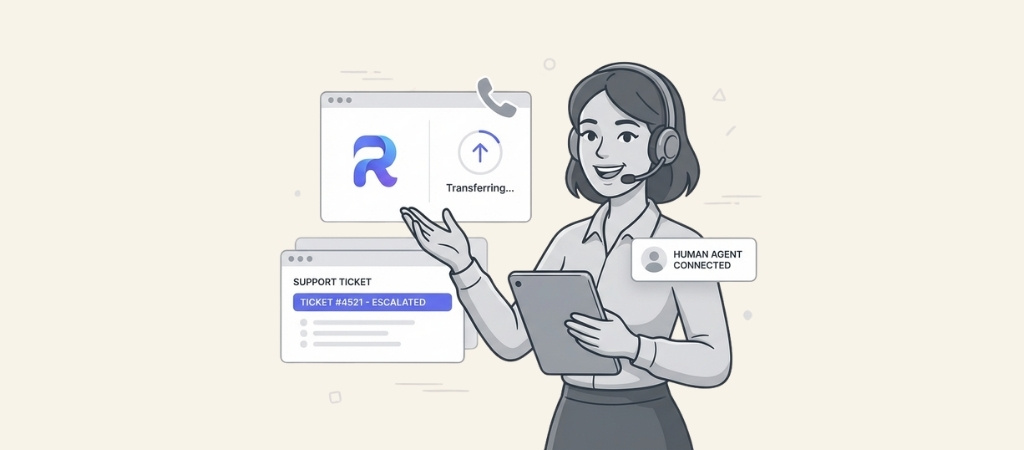
Each human support call costs your brand $2.35, and that number only climbs as you scale your team.
You built a high-growth brand to escape manual labor, yet you feel the weight of every customer call dragging your team down.
You know that hiring more tiers of agents is a "death sentence" for your margins, but you fear that automation will only frustrate your buyers.
This guide will go over how to build an eCommerce support escalation system that automates 73% of your calls.
First, we will break down the hidden costs of tiered human support.
Then, we will show you how to set up smart triggers that hand off calls to your team only when it truly matters.
Editor’s note: Want to hear some sample AI support calls made for your Shopify store?
- Just paste your store URL
- Get sample calls in under 20 seconds (no email required)
- Listen to demo AI calls for my store

Understanding customer support escalation
Customer support escalation is the process of passing a customer's issue to a person or team better equipped to solve it. It acts as a safety net. When the first point of contact cannot resolve an issue, there is a clear next step to provide assistance.
A common method for this is a tiered support model, which you'll see in platforms like RingCentral. It usually breaks down like this:
- Tier 1: These are frontline agents. They take care of common, simple questions like "Where is my order?" or "What's your return policy?" The goal is to solve as much as possible on the first call.
- Tier 2: If an issue gets more technical or needs deeper account access, it goes to a more experienced agent in Tier 2. They handle issues Tier 1 isn't equipped for.
- Tier 3: This is the last resort. Tier 3 is usually made up of specialists or engineers who deal with complex problems that no one else could fix.
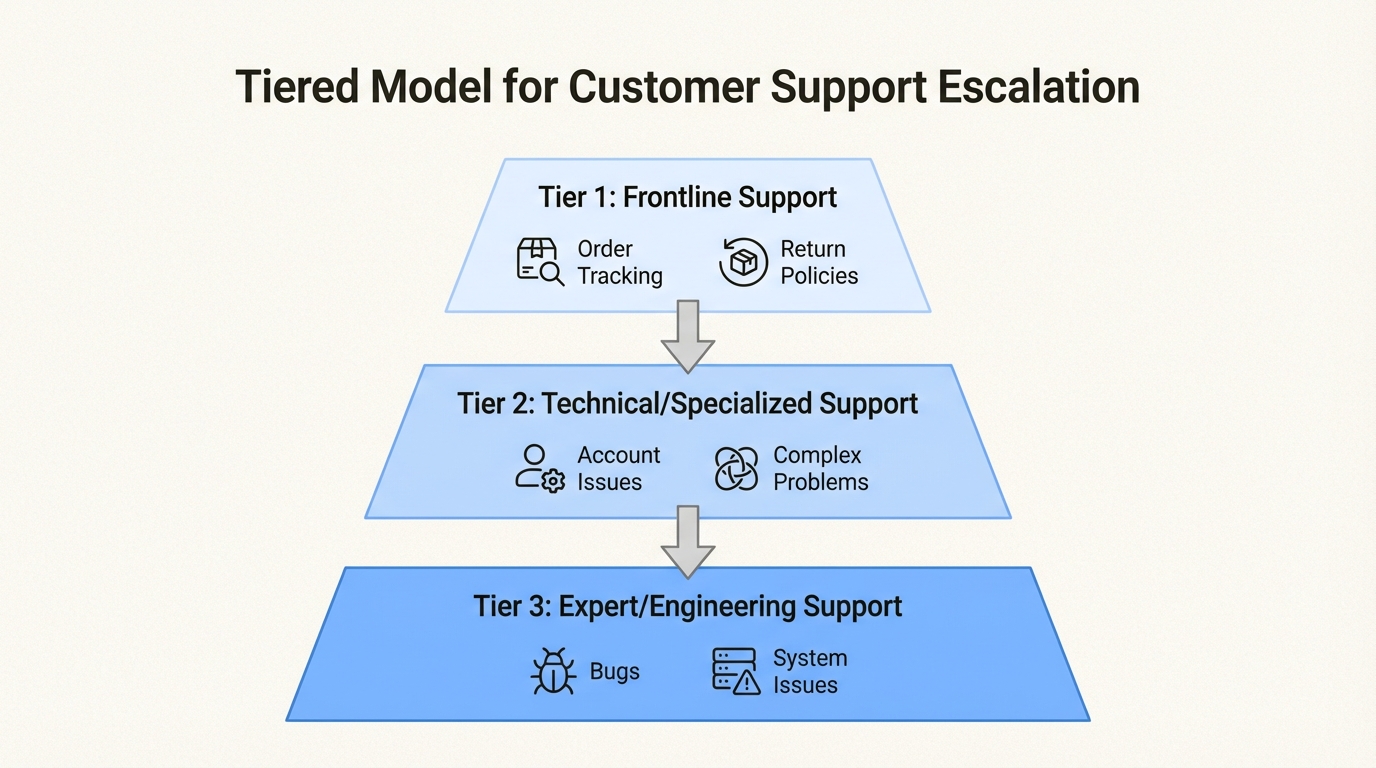
The goal of this system is efficiency. It allows skilled team members to focus on complex cases, while the frontline team handles common inquiries.
While this is a foundational concept, its traditional implementation faces modern challenges.
Challenges with traditional escalation models
The multi-tiered human model has been a standard for decades. For today's e-commerce businesses, however, it can present challenges related to cost, speed, and customer experience.
High operational costs
Staffing a multi-tiered support team can be costly, especially for providing service outside of standard business hours.
A human agent works a 40-hour week. To cover all 168 hours in a week, you need multiple shifts and a lot of people. At an average of $2.35 per call, that budget can grow quickly.
Compare that to an AI agent like the AI agent from Ringly.io, which works all 168 hours of the week for a different price structure, averaging about ~$0.38 per call.
Beyond direct costs, there is also the consideration of time. How many hours do your agents spend answering the same five questions again and again?
That is time they could be using to tackle tricky problems that improve customer satisfaction and retention.
The customer experience challenge
Being placed on hold is a common part of traditional escalation processes.
Customers wait for a Tier 1 agent, explain their issue, and then may be put back on hold to be transferred to Tier 2. This can be more difficult after hours or on weekends when many support teams are offline.
A common point of frustration for customers is having to repeat their issue to multiple agents. Each time a call gets passed along, important context can be lost, and the customer has to start over.
Service quality can also be inconsistent. A customer's experience might depend entirely on which agent they get. A new hire might not have the answers, which can lead to incorrect information or an unnecessary escalation that uses everyone's time.
The challenge of scaling support
For a growing e-commerce store, scaling a traditional support model can be difficult. When a big sale causes a sudden spike in calls, your support team can become overwhelmed.
Hiring and training new agents takes time, and while that is happening, service quality can drop and your team may get burned out.
For international sales, building a multilingual human support team presents significant financial and logistical challenges.
An AI-first model can handle this instantly. For instance, Ringly.io supports 30 languages from the get-go, so you can offer support to customers anywhere in the world.
How Ringly.io handles intelligent support escalation
Modern AI platforms offer a different approach to the escalation process. the AI, the AI phone agent from Ringly.io, is an example of this approach. It's built to handle the unique challenges of e-commerce.
Automating tier 1 with a high resolution rate
The primary concept is to leverage AI for tasks it handles effectively. the AI is designed to function as a Tier 1 agent. It’s on duty 24/7, so it answers every single call instantly, whether it's 2 PM on a Tuesday or 2 AM on a Sunday.
This reduces wait times and missed calls.
Because the AI plugs directly into your Shopify store, it can handle most common e-commerce questions on its own.
It can look up order statuses in real-time, answer product questions from your knowledge base, and even process returns and exchanges based on your store's policies.
Across more than Shopify stores, the AI has an average resolution rate of 73%.
That means a high percentage of all support calls are handled from start to finish without a human ever getting involved.
Using smart triggers for escalation
An effective AI system doesn't just wait for an explicit request for a human agent. A positive experience is facilitated by knowing when and why to escalate.
A platform like Ringly.io uses a few different triggers to hand off calls at just the right moment, as this graphic illustrates.
For instance, if a customer asks something that isn't in its knowledge base, the AI is designed to not provide speculative answers. It's trained to say it doesn't know and then escalate to your team.
You can also set it up to detect when a caller is getting frustrated.
If their tone of voice changes, the AI can proactively pass the call to a human who can offer the empathy needed to fix the situation.
Sometimes customers just want to talk to a person, and that's fine. But you can set rules to avoid escalating too early. For example, you can tell the system to only escalate after a caller asks for a human twice.
This gives the AI another shot at solving the problem first. And if the AI tries to do something, like look up an order, and gets an error, it knows to escalate automatically.
Offering flexible escalation modes
Users should have control over how escalations function. Ringly.io gives you straightforward options to manage the process in a way that fits your team's workflow.
During your business hours, the AI can try a live, warm transfer directly to your support team. The customer gets connected to a person who can pick up the conversation right where the AI left off.
If it's after hours or your team is swamped, the AI can switch gears. It will gather all the necessary details from the caller: name, contact info, and a summary of the problem, and then automatically create a detailed support ticket in your help desk.
This ticket even includes a full call transcript, so your team has all the context they need to follow up.
How to design an effective escalation workflow
Getting started with an AI-first model can be a straightforward process. With Ringly.io, you can set up a smart escalation workflow in a few steps, no developers needed.
Define your escalation strategy
First, you need to decide on your basic approach. There are generally two ways to think about AI escalation:
- Resolution-First: With this model, the main goal is to automate as much as possible. The AI is set up to try everything it can to solve the customer's problem on its own. It only escalates as a last resort. This approach can save money and free up your human agents' time.
- Escalation-First: This strategy prioritizes a human touch. The AI handles the basics, like greeting the customer and figuring out what they need, but it's designed to escalate to a person at the first sign of trouble or whenever the customer asks. This is a good fit for brands that want to rely heavily on human interaction.
Ringly.io makes it easy to set up either strategy. For example, for a resolution-first approach, you can create a rule to only "transfer after two failed attempts" to find an order.
This gives the AI a chance to get it right while still having a safety net.
Ensure a seamless and contextual handoff
A significant challenge in traditional escalation is the loss of context. An effective handoff ensures the human agent has all the information from the prior interaction.
For example, when Ringly.io's the AI creates a support ticket, it includes a full transcript of the conversation and an AI-generated summary. Your agent can see exactly what the customer asked and what the AI did, so they can get straight to solving the problem.
Plus, every interaction is logged in your dashboard's Call History, so agents can see a customer's entire history at a glance.
Analyze and optimize escalation performance
An effective escalation strategy benefits from ongoing analysis and adjustment.
The analytics dashboard in Ringly.io gives you the insights you need to see what’s working and what can be improved. You can keep an eye on key numbers like call volume, resolution rates, and how long calls are taking.
The platform includes features for analysis. It automatically finds and flags "knowledge gaps," which are times when the AI couldn't answer a question because it didn't have the information. This gives you a clear to-do list.
By adding answers to these flagged questions to your knowledge base, you can improve your AI's resolution rate over time and cut down on the number of escalations your team deals with.
Comparing escalation models and pricing
Comparing a human-centric model with an AI-first model reveals differences in efficiency, scalability, and cost structure.
A platform like RingCentral provides a suite of communication tools, with its support model structured around human agents and tiers. Access to 24/7 help may depend on higher-tier plans and is often for technical support, not general questions.
Pricing is often based on per-user licenses, a model that differs from usage-based pricing which may align with the variable call volumes in e-commerce.
The AI-first model from Ringly.io operates on a different structure. AI handles a majority of calls, allowing human teams to focus on more complex issues rather than frontline questions.
This approach has a different cost structure and is designed to scale with a business.
Here’s a quick comparison:
| Feature | RingCentral (Human-Centric Model) | Ringly.io (AI-First Model) |
|---|---|---|
| Primary Handler | Tiered human agents with AI add-ons | "Seth" the AI phone rep |
| Availability | Varies by plan; technical support is 24/7, but other teams may have business hours | 24/7, instantly answers every call |
| Escalation Path | Progresses through human tiers (e.g., Tier 1, 2, 3) | AI resolves ~73% of calls; escalates to humans via transfer or ticket |
| Cost Driver | Per-user licenses and feature bundles | Monthly subscription based on call minutes |
| Pricing Model | Multi-plan structure with various add-ons | Tiered plans based on usage for Shopify stores |
| Ringly.io Grow Plan | N/A | $349/month for 1,000 minutes. Includes order lookups, returns, and escalations. |
| Performance Guarantee | Not specified | get your last 3 months refunded if Seth resolves under 65% of calls in 90 days. |
A path forward for customer support
Customer support is evolving. Businesses are increasingly adopting flexible and efficient AI-driven workflows to enhance the customer experience.
A modern AI escalation process involves more than simply transferring a call when an automated system cannot find an answer. It's about having a system that solves most problems instantly, knows exactly when a human touch is needed, and gives that person all the information they need to fix the issue right away.
For Shopify stores looking to provide 24/7 support while managing costs, an AI-first approach can be a significant advantage.
Ready to see how a smarter escalation process can change your customer support? Start your trial with Ringly.io and get your own AI phone agent set up within an hour for most stores.
Frequently Asked Questions
What is the primary goal of a support escalation process with Ringly.io?
The main goal is to solve customer issues efficiently. It uses an AI agent to handle most common questions (about 73%) on its own. For more complex problems, the process ensures a smooth handoff to a human agent with all the necessary context, so the customer doesn't have to repeat themselves.
How does Ringly.io determine when a support escalation is necessary?
Ringly.io uses smart triggers to determine when an escalation is needed. This can happen if a customer asks a question the AI doesn't know, if the customer becomes frustrated (detected by their tone), or if they specifically ask to speak to a person. The system is designed to escalate at the right moment to avoid customer frustration.
Can I customize the rules for my support escalation workflow in Ringly.io?
Yes, you have control over your escalation strategy. You can choose a "resolution-first" approach that maximizes automation or an "escalation-first" approach that prioritizes a human touch. For example, you can set rules like only transferring a call after the AI has made two attempts to solve the issue.
What happens during a support escalation with Ringly.io when my team is unavailable?
If an escalation happens outside of your business hours or when your team is busy, Ringly.io won't just leave the customer hanging. Instead, the AI will collect all the caller's details and the issue summary, then automatically create a support ticket in your help desk. The ticket includes a full call transcript so your team can follow up effectively later.
How does Ringly.io's escalation process prevent the loss of customer context during a handoff?
This is a key feature. When an escalation occurs, the human agent receives a detailed ticket with a full call transcript and an AI-generated summary. This means they know exactly what the customer's issue is and what has already been tried, allowing for a seamless conversation instead of making the customer start over.
What makes the Ringly.io support escalation model cost-effective compared to traditional models?
It's more cost-effective because the AI, the AI, resolves nearly three-quarters of all calls without needing a human. This drastically reduces the number of calls your paid agents have to handle, allowing them to focus on high-value issues. This model avoids the high costs of staffing a 24/7 human support team.



