The short version.
- The Gorgias chat widget is the chat bubble on your storefront. It surfaces order info, lets shoppers self-serve order status, and routes the rest to your team.
- The config that holds up at scale comes down to six choices: how you install it, how you customize it, what self-service flows you turn on, whether you run the AI Agent, how you set business hours, and whether you keep it on mobile.
- Written for operators at $10M-$100M Shopify brands running Gorgias with a visible phone number, who want the widget set up right and want to know where it stops.
The chat bubble is the most-touched piece of support UI on a Shopify store, and most teams ship it on the defaults. Default color, default position, no self-service flows, business hours nobody set. It works, but it leaves money and time on the table.
I installed the Gorgias chat widget on a test Shopify store and walked the whole config, top to bottom, to see what actually moves the needle. Then I mapped which part of your support load it really reaches. The answer surprised me, and it's the reason this post ends where it does.
If you run support at a Shopify brand doing $10M-$100M, you already field the same questions over and over: where's my order, can I change my address, what's your return window. The widget can take a real chunk of that off your team. Here's how to set it up so it does, and the one channel it never touches. If you want a second pair of eyes on your whole support stack, book a 30-min call and we'll talk through your case.
What the Gorgias chat widget actually is
The Gorgias chat widget is the live-chat bubble that sits on your storefront, by default in the bottom-right corner. When a shopper opens it, your team sees their order history and customer details right next to the conversation, so nobody is asking "what's your order number?" for the fifth time that hour.
It's one channel inside the Gorgias helpdesk, not the whole thing. Email, social, and phone live elsewhere in Gorgias (or outside it). The widget is the part your website visitors actually see and tap.
The widget's real job is to catch the shopper before they leave the page, answer the easy stuff, and hand the hard stuff to a human with full context. Done well, it doubles as a sales surface, not just a support cost. Gorgias points to customers like Lillie's Q seeing a 75% lift in sales from chat, and Marine Layer reporting a 75% jump in online orders after leaning on it (their numbers, from the Gorgias live chat page). Treat those as best-case, but the direction is right: a good widget sells, a bad one just deflects.
How to install the widget on Shopify
There are two ways to get the widget on your store, and the one you pick has consequences later.
Quick install (1-click). Gorgias injects the widget into your Shopify theme automatically. It's the fastest path and fine for most stores. The catch: if you ever re-run quick install, it re-injects the widget in its default state and wipes any advanced HTML customization you added. More than one team has lost an afternoon of CSS work this way.
Manual install. You drop the script into your theme yourself, which lets you target specific pages, run on a headless Shopify build, or fire it through Google Tag Manager. If you plan to do any advanced styling, install manually from the start so quick install can't overwrite it.
Either way, you can control where the bubble shows up. In Settings, open the Installation tab, click the pencil under "Quick installation for Shopify," and choose "Hide on specific pages." A lot of stores hide it on the cart and checkout to keep the path to purchase clean, then add a chat option to checkout deliberately for high-AOV carts.
One thing operators worry about: speed. Gorgias loads its widget after the rest of your page content, so it doesn't block the first paint. According to a 2026 speed-impact report, it loads three scripts totaling about 195KB and adds roughly 200-380ms to total load time. Real, but small, and largely invisible to the shopper.
Customizing the widget to match your brand
A default widget looks like every other Gorgias install on the internet. A few minutes in the appearance settings fixes that.
Go to Settings, then Channels, then Chat, then your chat integration, then Appearance. You get a live preview on the right as you change things. You can set:
- Header and bubble color: pick a solid color or a gradient fill that matches your brand palette.
- Avatar and greeting: swap the default icon for your logo or a real person's photo, and write a greeting that sounds like your brand, not a robot.
- Position: keep it bottom-right, move it to any corner, or nudge it by a set number of pixels so it doesn't cover your own sticky buttons.
For anything past the built-in settings, Gorgias supports HTML and CSS snippets placed just below the chat install script, between the body tags in your theme.liquid. That's where you'd restyle the launcher button or tweak spacing. This is the part that quick install wipes, so do your advanced styling on a manual install and you only have to do it once. If you need the deeper customization, the advanced HTML docs walk through it, but you'll want someone comfortable in theme code.
Self-service, quick responses, and AI on the widget
This is where the widget earns its keep. Three layers stack here, and knowing the difference saves you money.
Self-service flows. These let a shopper find their order status and shipping info right inside the bubble without ever creating a ticket. For a DTC store, WISMO (where's my order) is 30-40% of support volume and over 50% at peak, per Salesforce. Turning on order-status self-service is the single biggest win you can get in the widget. Pair it with WISMO automation across your other channels and the queue gets noticeably lighter.
Quick answers (flows / chatbot). These are script-based paths you build: if the shopper taps "returns," show the return policy; if they tap "sizing," show the size chart. Useful, but script-bound. The moment a shopper asks something you didn't script, the bot punts the conversation back to your team. It's a router, not a problem-solver.
AI Agent. This is the trained-on-your-store bot that can actually do things: track an order, update shipping, cancel an order, recommend a product. It's a real step up from flows. Two things to know before you switch it on. First, the advanced order actions only work for Shopify, BigCommerce, and Magento, not WooCommerce. Second, it's priced per resolution: about $1.00 per resolution on a monthly contract, $0.90 on annual, and beyond your plan's allowance each one runs around $1.50, per a 2026 pricing breakdown. The part that catches teams off guard: a resolution also counts as a helpdesk ticket, so a cleanly automated chat hits your bill twice.
And be honest with yourself about the automation rate. Gorgias markets "up to 60%," but their own published case studies land at 26-56% (myAskAI analysis). That's still a meaningful dent, just plan around the real number, not the headline. If you're weighing the widget bot against other tools like Tidio or eesel, the same rule holds: the script-bound layer deflects, the trained-agent layer resolves, and only the second one is worth paying per conversation for. For more on the agent side, see our breakdown of the Gorgias AI agent.
Business hours, offline mode, and mobile
Your team isn't online at 11 p.m., and the widget should know that.
Set your business hours in the chat settings and the widget shows an online or offline status to match. When the team logs off, it switches to an offline form that collects the shopper's email and creates a ticket, so nothing gets lost overnight. You can also set availability per agent, which matters once you've got 3-12 reps on rotation and staggered shifts.
Set business hours honestly, or the widget promises a live human at 2 a.m. and then makes the shopper feel ignored. An offline form that says "we'll reply by 9 a.m." beats a chat box that looks live and isn't.
On mobile, you have a lever most teams forget: you can hide the widget entirely on mobile devices. If your mobile chat usage is low, hiding it there is a clean speed win and removes a bubble that often covers the add-to-cart button on small screens. Test your own analytics first. If mobile is where your shoppers actually chat, leave it on.
The best widget config for a DTC store
Here's the config I'd run on a $10M-$100M Shopify store, after walking the whole setup. Treat it as a starting point, then tune to your own data.
- Install manually if you plan to customize at all. It's ten extra minutes and it stops quick install from ever wiping your styling.
- Turn on order-status self-service first. It's the biggest single deflection lever because WISMO is the biggest single ticket source.
- Run the AI Agent for order actions if you're on Shopify, but model the real cost: per-resolution plus the ticket double-count, against the 26-56% real automation rate. Don't budget off the 60% marketing number.
- Build a few quick-answer flows for returns, sizing, and shipping policy. They're free and they catch the predictable taps.
- Set business hours and an honest offline form so after-hours shoppers get a clear next step instead of a dead chat box.
- Hide the widget on cart and checkout unless you have a deliberate reason to keep it (high-AOV carts that benefit from a nudge).
- Check mobile usage before deciding whether to keep the bubble on phones. Low usage means hide it for speed.
- Add one chat campaign triggered on the checkout or a high-intent product page to recover hesitating shoppers.
Get those eight right and the widget stops being a default bubble and starts being a real part of your Shopify customer service stack. For the full picture on how chat fits with the rest of Gorgias, our Gorgias Shopify integration guide goes deeper.
The one channel the chat widget can't cover
There's one thing the docs and the reviews skip. The widget is a chat surface on your website. It does nothing for your phone line.
If you have a visible phone number, and most $10M-$100M Shopify brands do, a real slice of your customers will call instead of chat. Older buyers, high-AOV buyers, anyone who'd rather talk than type. Those calls don't show up in your chat widget. They ring a number, and after 6 p.m. they roll to voicemail.
The numbers on that channel are rough. Businesses answer only 37.8% of inbound calls, per AmbsCallCenter. And 85% of callers who can't reach a person never call back, with 62% switching to a competitor, per a PCN missed-call study. So the same WISMO question your widget deflects beautifully on chat becomes a lost sale on the phone, because nobody picked up.
That's the gap Ringly.io fills. Ringly is AI phone support for Shopify brands. It sits in front of your phone line, not your chat widget, and answers inbound calls 24/7: order status, returns, product questions, the same routine stuff your widget handles in chat. Across 50+ brands the AI resolves 73% of calls on its own at roughly $0.42 per resolved call, and anything that needs a human escalates cleanly to Gorgias or whatever helpdesk you already run. It pulls order data the same way your widget does, through order-status lookups and your knowledge base.
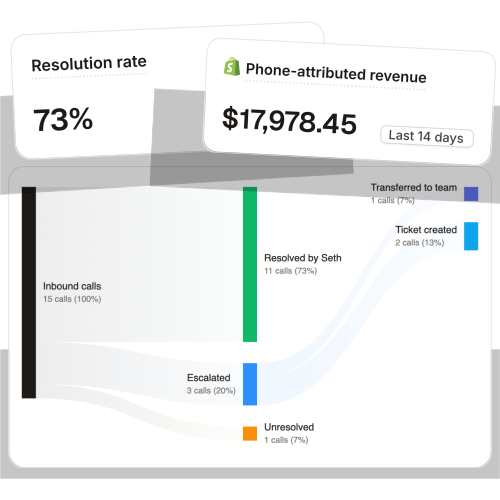
The quality is the part people don't expect.
"My customers also feel like it's a normal person. They feel like they can communicate if they have questions."
Claudia Droge, TechCraft Studio
WashCo, a Shopify brand we launched, recovered $22,664 in its first 7 days on the phone. The math behind that is the same payroll math as your chat team, just on the channel the widget can't see.
Take a typical $50M Shopify brand running a 6-rep CS team:
| Line item | Today | With Ringly |
|---|---|---|
| 6 reps × $4K loaded per rep | $24,000/mo | n/a |
| Ringly (~$5K/mo) | n/a | $5,000/mo |
| Net monthly phone-support spend | $24,000/mo | $5,000/mo |
| Monthly savings | n/a | $19,000/mo |
| Annual savings | n/a | $228,000/yr |
That's roughly 70% of repeatable calls (order status, returns, the same five things over and over) handled by the AI, with the genuinely complex calls still going to your team. If your phone keeps rolling to voicemail after hours, book a 30-min call and we'll talk through what your line is leaking. For the longer take on why phone behaves differently from chat, see chat vs phone support for ecommerce and our guide to 24/7 ecommerce phone support.
Frequently asked questions
How do I add the Gorgias chat widget to my Shopify store? Use the 1-click quick install to inject the widget into your theme automatically, or install manually if you want to target specific pages or do advanced styling. Manual install is worth it if you plan to customize, because re-running quick install wipes any custom HTML.
Can I customize the Gorgias chat widget to match my brand? Yes. In Settings, Channels, Chat, Appearance you can change the header and bubble color, choose a solid or gradient fill, set the avatar and greeting, and reposition the bubble. For anything deeper, you add HTML and CSS below the install script in your theme.liquid.
Does the Gorgias chat widget slow down my Shopify store? Barely. It loads after the rest of your page content, so it doesn't block the first paint. A 2026 speed report measured about 195KB across three scripts and roughly 200-380ms added to total load, which shoppers don't really perceive.
Can I hide the chat widget on certain pages or on mobile? Yes to both. Use the Installation tab to hide it on specific pages like cart and checkout, and there's a separate toggle to hide it entirely on mobile. Hiding it on mobile is a clean speed win if your mobile chat usage is low.
Does the Gorgias chat widget answer questions on its own? Partly. Self-service flows and script-based quick answers handle order status and FAQs, but they punt anything off-script back to your team. The AI Agent goes further and can take real actions like tracking or canceling orders, though it's priced per resolution and the advanced actions are Shopify, BigCommerce, and Magento only.
How much does the Gorgias chat widget cost? The widget comes with your Gorgias plan, which runs from about $10/mo (Starter, 50 tickets) to $900/mo (Advanced, 5,000 tickets), 20% off on annual. The AI Agent is extra at roughly $0.90-$1.00 per resolution, and each resolution also counts as a ticket, so model that double-count before you turn it on.
What can the Gorgias chat widget not do? It only works on chat. It does nothing for your phone line, so after-hours calls and the customers who prefer to talk still roll to voicemail. That's the channel an AI phone agent like Ringly covers, sitting in front of the phone and escalating to Gorgias when a human is needed.
Does the chat widget work after business hours? Yes, in offline mode. When your team logs off, the widget switches to an offline form that collects the shopper's email and creates a ticket so nothing is lost overnight. Set your business hours honestly so the widget doesn't promise a live human when no one is online.
Talk to us

If you run a $10M-$100M Shopify brand and the calls keep rolling to voicemail after 6 p.m., a 30-min call is the fastest way to see what the phone line is leaking. The widget has your chat covered. We'll look at the channel it can't.
The 3-layer guarantee.
- Live in 14 days or it's free until launched.
- 65% resolution in 90 days or we refund the last 3 months of subscription fees.
- We keep working free until we hit it.
Ruben (Ringly co-founder) takes these calls personally.