This guide in 30 seconds.
- The Gorgias help center is the right first move for cutting self-service and chat tickets. It just won’t touch your phone line.
- You’ll get the exact 4-phase setup (basics, branding, articles, AI toggles, publish) plus the Shopify-specific toggles most setup pages skim past.
- Built for founders, COOs, and Heads of CX at $10M-$100M Shopify brands running a paid helpdesk with a visible phone number.
So you’ve got Gorgias wired into Shopify and you’re standing up the help center to take some weight off the team. Good call. A help center built on your real order data deflects a real chunk of the same questions over and over. The part nobody puts on the setup page: it deflects email and chat, and it leaves your inbound phone line exactly where it was.
This is written for the operator running customer experience at a Shopify or Shopify Plus brand doing $10M-$100M a year, with 3 to 12 reps and a phone number sitting in your site footer. If after-hours calls roll to voicemail and your reps spend their mornings on “where’s my order,” the help center is half the fix. We’ve set up AI phone agents for 50+ Shopify brands to handle the other half, and you can book a 30-min call if you want us to map your phone volume live.
Here’s the channel picture before we get into the setup screens, so you can see where the help center actually moves the needle.
| Channel | What the Gorgias help center does | Who handles the rest |
|---|---|---|
| Self-service articles | Deflects repeat questions on your site | Customer self-serves |
| Chat / email | Feeds the AI Agent answers from your articles | Your CS team on the hard ones |
| Inbound phone | Nothing. The help center does not pick up calls | A rep, or voicemail |
| After-hours phone | Nothing | Voicemail, then a callback queue |
If you only take one thing from that table: the help center is a self-service and chat lever, not a phone lever. Set it up well, then read the back half of this guide for the channel it leaves open.
What the Gorgias help center actually is, and how it ties to Shopify
The Gorgias help center is a self-service article hub. Customers land on it, search, and find the answer to a routine question without opening a ticket. The same articles feed the AI Agent’s knowledge base, so the chat bot answers from your real policies instead of guessing.
The Shopify link is the strong part. Once you install Gorgias from the Shopify App Store and connect your store, it syncs customer profiles, order history, and browsing data in real time. Reps can refund, cancel, edit, and duplicate orders, create discount codes, and check inventory from inside the ticket, no tab-switching. Reviewers consistently call this the deepest Shopify sync in the helpdesk category, and the scores back it up: Gorgias holds a 4.6 out of 5 across 547 G2 reviews and a 4.2 with 83% five-star ratings on the Shopify App Store.
The help center turns your order data into answers, but only on the channels a customer types into. A shopper who calls instead of typing never touches it.
One housekeeping fact the setup flow assumes you know: the help center is available on every Gorgias helpdesk plan, at no separate fee, but you cannot create one during the free trial. You need an active plan first.
How I set up the Gorgias help center on a Shopify store
I connected a test Shopify store to Gorgias and ran the help center setup end to end, documenting each screen, then watched what it deflected against what still rang the phone. The steps below are the order that actually works, not the order the menu suggests.
The setup runs in four phases inside Settings, under Channels, then Help Center:
- Basics. Enter your brand name and a subdomain for the help center URL, pick a default language (add more later), and choose the platform type. Select “Ecommerce platforms,” then pick your connected Shopify store. That connection is what unlocks the AI features and auto-embedding, so don’t skip it.
- Branding. Upload a logo (under 500KB, 1640 by 624 pixels works cleanly), set your accent color by hex code, choose a font, and pick a layout. The “card” layout reads better than the single-page one for most stores with more than a handful of articles.
- Articles. Gorgias suggests templates. Pick the ones that match your real top questions (returns, shipping, order changes) and edit them now while you’re in the flow. Empty article shells help nobody.
- AI Agent features. Toggle on the Shopify-specific features: flows, article recommendations, and order management. These are the toggles most walkthroughs gloss over, and they’re the reason a connected store outperforms a generic help center.
Then publish. The help center is not live to shoppers until you flip “Set Help Center live” in the Publish and Track tab. From there you can auto-embed it on your site, drop in the manual code, or share it on the Gorgias subdomain or a custom domain.
Plan for an afternoon, not an hour. Four-star reviewers say the same thing across both review sites: the Shopify connection is clean, but the help center plus rules plus macros is not a one-coffee job. If you run a heavier stack with third-party tools, budget more configuration time.
What the help center deflects, and what it quietly does not
Here’s where the channel math gets honest. A help center is built to deflect the repeatable stuff, and the most repeatable stuff in ecommerce is “where’s my order.” WISMO runs 30-40% of all tickets and spikes past 50% at peak, according to Salesforce. Put a good order-status article and a connected AI Agent in front of that, and you’ll watch your chat and email volume drop.
But deflection only happens on the channels a customer types into. Your help center answers the shopper who searches your site or opens chat. It does not answer the one who picks up the phone, and for a $10M-$100M brand with an older or higher-intent customer base, a real share of your contacts dial instead of type.
The help center can cut your typed-ticket volume in half and still leave your phone ringing exactly as much as before. Self-service and chat AI are one job. The phone is a different job, and Gorgias’s help center was never built to do it.
That’s not a knock on the tool. It’s the boundary of what a self-service hub plus a chat bot can cover. If you want the deeper read on where the helpdesk itself stops, we wrote one on what Gorgias fixes and what still rings out.
The cost reality nobody puts on the setup page
The help center itself is free on every plan. The thing to watch is what happens after it, when a question slips past the article and into the AI Agent.
Gorgias bills the AI Agent at $0.90 to $1.00 per resolution, and per their own billing docs, that resolution also counts as a helpdesk ticket. So an AI-resolved conversation can hit you twice: the AI fee plus a ticket against your plan allowance. List prices run from a $10 starter tier up to $900 for Advanced, with ticket overages of $0.32 to $0.40 and AI interactions beyond your allowance at $1.50 each. Independent pricing breakdowns show a $360 plan can land closer to $960 once AI resolutions and overages stack up. The full picture is in our Gorgias pricing breakdown.
Every question your help center deflects before it reaches the AI Agent is a per-resolution fee you don’t pay. That’s the real ROI of writing good articles: not just fewer reps touching tickets, but fewer billable AI resolutions. It’s also one more reason the phone gap matters. None of this billing logic does anything for the calls that never become tickets in the first place.
The channel the help center leaves open: your phone line
So your help center is live, your chat volume is down, your AI Agent is fielding the typed questions. Walk over to the phone line and the story is unchanged.
The numbers on missed phone calls are brutal, and they’re external, not ours. Businesses answer only 37.8% of inbound calls; the rest go to voicemail or nothing, per AmbsCallCenter. 85% of callers who can’t reach a person never call back, and 62% switch to a competitor, according to PCN’s 2026 missed-call study. A help center does not move any of those numbers, because the caller never reaches a keyboard.
This is the channel where a brand quietly loses both payroll and revenue at the same time. Reps spend their day on phone WISMO that an article would have deflected if the customer had typed it. After 6 p.m., the same calls roll to voicemail and sit there. WashCo, a Shopify brand we launched, recovered $22,664 in its first 7 days once an AI agent started picking up those calls instead of voicemail.
The phone is the one channel a help center and a chat bot structurally cannot reach, and it’s where the after-hours money leaks. Closing it is a separate move.
“My customers also feel like it’s a normal person. They feel like they can communicate if they have questions.”
— Claudia Droge, TechCraft Studio
How to close the phone gap without ripping out Gorgias
You don’t replace your helpdesk to fix the phone. You put an AI phone agent in front of it.
Ringly.io: AI phone support for Shopify brands
Best for: $10M-$100M Shopify brands that have the help center and chat handled but still send every phone call to a rep or voicemail.
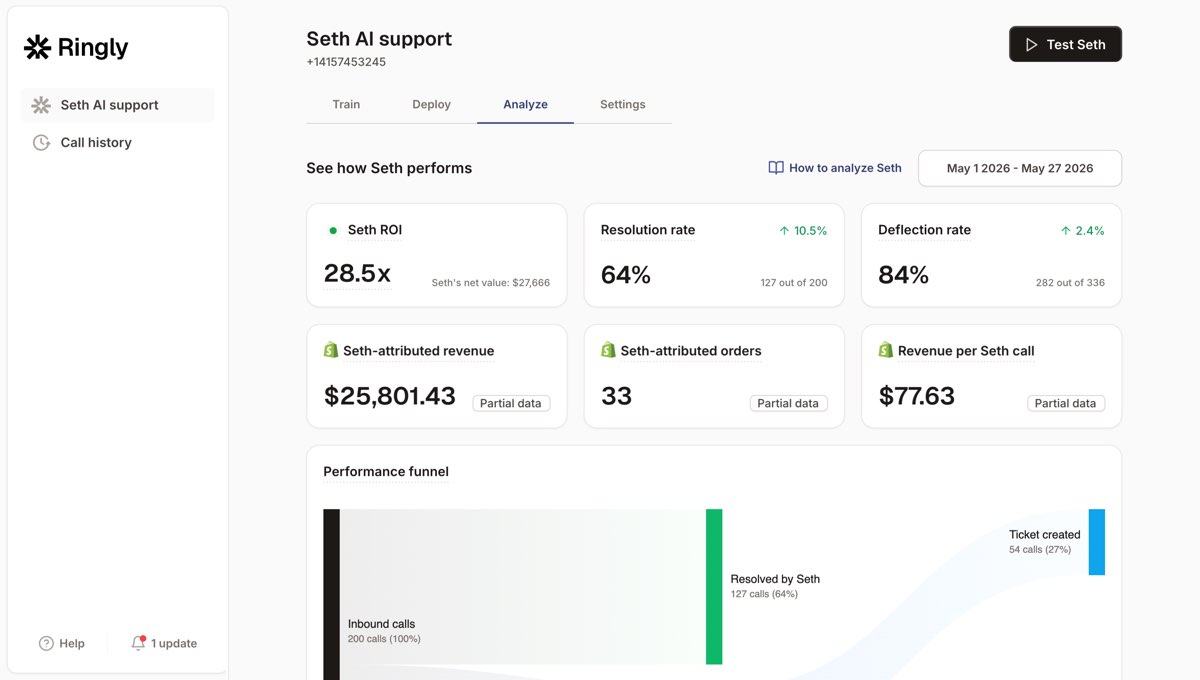
Ringly is AI phone support for Shopify brands. Keep your current phone number, your help center, and your workflows. Add an AI that answers the routine inbound calls so your team can focus on the work that actually moves revenue. The AI answers 24/7, finds orders in your Shopify store, processes returns and exchanges, and answers product questions from your knowledge base. Calls that need a human escalate cleanly into Gorgias, so the phone becomes one more channel your helpdesk sees, not a black hole.
What works
- It picks up the call the help center can’t. Across 50+ brands the AI resolves 73% of inbound calls on its own, at roughly $0.42 per resolved call versus $7 to $16 for a human BPO call.
- It sits in front of Gorgias, not on top of it. Phone calls escalate into your existing helpdesk with full context, so nothing about your current setup gets ripped out.
- It covers after-hours. The 6 p.m. voicemail queue stops existing. BioLongevity Labs, a supplement brand with comparable volume, hits 79% resolution autonomously.
- It’s live fast. Add your site, docs, or help center articles and the agent is ready in under an hour.
What doesn’t
- It’s phone-first. If your contact volume is almost entirely chat and email, the help center plus a chat bot may already cover you, and you may not need this yet.
- It’s not a Gorgias replacement. It doesn’t manage your email queue or your macros. It handles the phone and hands the rest to your helpdesk.
Pricing
Grow is $349/mo (1,000 minutes), Pro is $799/mo (2,500 minutes), and Enterprise is custom for $10M-$100M brands with 3-12 reps. There’s a 65% resolution guarantee: if the AI resolves under 65% of your calls in 90 days, you get the last 3 months back. Full numbers are on the pricing page.
Here’s the math most operators run when they look at the phone line. Take a typical $50M Shopify brand running a 6-rep CS team:
| Line item | Today | With an AI phone agent |
|---|---|---|
| 6 reps at $4K loaded per rep | $24,000/mo | n/a |
| AI phone support (~$5K/mo) | n/a | $5,000/mo |
| Net monthly CS spend | $24,000/mo | $5,000/mo |
| Monthly savings | n/a | $19,000/mo |
| Annual savings | n/a | $228,000/yr |
That’s the same 70-80% repeatable calls (order status, returns, the same five things) routed to the AI. The genuinely complex calls still go to your team, who now have time to actually solve them instead of hiring rep number 7. If you want us to run those numbers against your real call volume, book a 30-min call and we’ll do the math live.
Help center vs chat AI vs phone AI: which handles what
Three different jobs, three different tools. Stacking all three is how the biggest Shopify brands keep support flat while volume climbs.
- Choose a help center if you want to deflect repeat self-service questions and feed your chat AI accurate answers. Every Shopify brand should have one. It’s the cheapest deflection you’ll buy.
- Choose a chat AI (Gorgias AI Agent) if a real share of your typed volume is routine and you’re fine paying per resolution. Watch the per-ticket and AI fees so a $360 plan doesn’t quietly become $960.
- Choose an AI phone agent if you have a visible phone number, after-hours calls hit voicemail, and your reps lose mornings to phone WISMO. This is the channel the other two can’t reach.
If you’re weighing the whole helpdesk and not just the help center, our Gorgias alternatives breakdown covers the full field, and our deeper ecommerce phone support guide covers the phone channel on its own.
Frequently asked questions
Is the Gorgias help center included in the Shopify integration, or is it a separate cost? It’s included on every Gorgias helpdesk plan at no separate fee. You do need an active plan, since you can’t create a help center during the free trial. The Shopify connection is what unlocks the AI features and auto-embedding.
Does the Gorgias help center reduce phone calls? Mostly no. It deflects self-service and chat questions, which cuts typed-ticket volume, but it does not pick up the phone. Inbound and after-hours calls still go to a rep or voicemail unless you add a separate phone layer.
How long does it take to set up the help center on Shopify? The four phases (basics, branding, articles, AI toggles) take an afternoon if your articles are ready. Reviewers consistently note the Shopify sync is clean but the full helpdesk setup, including rules and macros, is not a one-hour job.
What are the Shopify-specific toggles in the help center setup? Flows, article recommendations, and order management. They only appear once you’ve selected your connected Shopify store during the basics step, and they’re the reason a connected store deflects more than a generic help center.
Does Ringly replace Gorgias? No. Ringly handles the inbound phone calls and escalates anything complex into Gorgias with full context. You keep your helpdesk, your number, and your workflows. It sits in front of the helpdesk, not on top of it.
How does Ringly use my help center articles? The AI phone agent can pull from the same knowledge base, your site, and your docs to answer callers, so your phone answers stay consistent with what your help center tells people who type. Across 50+ brands it resolves 73% of calls autonomously.
Talk to us

If you run a $10M-$100M Shopify brand and your phone still rolls to a rep or voicemail, a 30-min call is the fastest way to see what that channel is costing you. We’ll pull your missed-call picture and do the math live against your real volume.
The 3-layer guarantee.
- Live in 14 days or it’s free until launched.
- 65% resolution in 90 days or we refund the last 3 months of subscription fees.
- We keep working free until we hit 65%.
Ruben (Ringly co-founder) takes these calls personally.