


If you have been handed a Gorgias account and a list of things it should do, this is the developer overview to start from.
- Gorgias has an open REST API, a developer portal, and two kinds of apps (private and public). You can read and write tickets, customers, messages, events, integrations, and sidebar widgets.
- The honest part most docs skip: the API is the easy bit. The dev time to build a sync, and the maintenance to keep it from rotting, is the real cost. We cover build vs wire-up vs buy.
- Written for the technical ops lead, Head of CX, or founder at a $10M to $100M Shopify brand who runs Gorgias and got asked to make it do more.
Most people searching "gorgias developer" are not platform engineers. They are the one technical person at a mid-market Shopify brand who got pulled into a thread that starts with "can Gorgias just do this." So this is a plain overview of what the Gorgias developer platform actually gives you, what you can build with it, and where building your own thing stops being worth it.
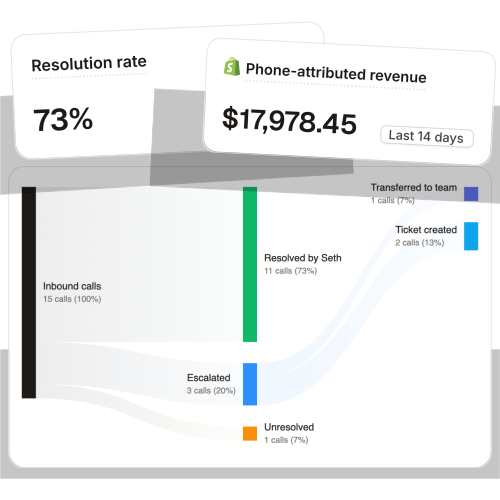
I'm Ruben, co-founder of Ringly.io. We built our own integration on this exact API: a voice agent that sits in front of Gorgias, resolves the routine call, and escalates the rest as a clean ticket. Across 50+ Shopify brands, it resolves 73% of inbound calls before a Gorgias ticket ever gets created. So the developer notes below come from shipping on this API in production, not from reading the docs once.
If you run a Shopify brand on Gorgias and you're weighing whether to build something custom or wire up an off-the-shelf path, book a 30-min call and we'll walk through what's worth your dev time and what isn't.
What the Gorgias developer platform actually gives you
Gorgias exposes an open REST API (the current version is V2). It lets you read and write almost everything in your helpdesk programmatically: tickets, customers, messages, events, tags, integrations, and the sidebar widgets your agents see. The base URL is account-specific, in the form https://{your-domain}.gorgias.com/api/.
The API surface is broad enough that most things you'd want Gorgias to do, it can do, the question is whether you should be the one wiring it. Around the API sits the developer portal, which is the part worth bookmarking. It has the API reference, an OpenAPI spec, Postman collections, a sandbox, an OAuth playground, and a llms.txt index so you can point an AI coding assistant straight at the docs.
There's also a developer newsletter and changelog covering upcoming and breaking changes. Subscribe to it. The single most common way a Gorgias integration breaks is a field or endpoint change you didn't see coming, and the changelog is where it gets announced first. If you're still getting oriented on the product side, our overview of Gorgias features and what the Gorgias helpdesk is covers the non-developer view.
If you want the deeper endpoint-by-endpoint picture, our companion piece on what the Gorgias API does and what to build goes one level lower than this overview.
Public apps vs private apps: which one you're building
Before you write a line of code, figure out which kind of app you're making, because the path is different.
A private app touches only your own Gorgias account and needs no approval, so you can deploy it today. That covers the overwhelming majority of what a single brand builds: an internal sync, a sidebar widget, a routing script. A public app is the other case: you're building something to distribute to other merchants through the Gorgias App Store, which means signing up on the developer portal, submitting the app, and passing review before it goes live.
| Private app | Public app | |
|---|---|---|
| Accesses | Your own account data | Any merchant who installs it |
| Approval | None | Submit + review required |
| Distribution | Internal only | Gorgias App Store |
| Best for | Brand-internal syncs, widgets, automations | Vendors building for the ecosystem |
For a Shopify brand solving its own support workflow, you almost always want a private app. The public route only makes sense if you're a tool builder trying to reach Gorgias merchants at large.
The core resources you'll work with
The API is organized around a handful of objects. Once you know what each one is for, the reference reads quickly.
- Tickets: the conversation object. Create, read, update, set status, assign, and tag. This is where most automation lives.
- Customers: customer profiles. Full CRUD, plus merging duplicates (a common cleanup job for brands that have imported data).
- Messages: the individual replies inside a ticket. Create them and pull conversation history.
- Events: the activity feed on tickets and customers, useful for syncing state changes elsewhere.
- Tags: how you categorize and route. Most routing logic is really tag logic.
- Integrations: the object that connects a 3rd-party service. You create one with POST /api/integrations, passing a type (such as http) and a config.
- Widgets: containers that show custom customer data in the right-hand ticket sidebar, fed by your HTTP integrations.
- Users: team-member provisioning, for brands managing seats programmatically.
One thing to plan around early: the API is rate limited. Gorgias uses a leaky-bucket model with plan-tiered limits (roughly a couple of requests per second on lower plans, more on Pro and Advanced), and it returns headers telling you how close you are plus when to retry. It's rarely a problem for event-driven work and very much a problem for bulk imports. We keep the detail light here on purpose, the Gorgias API guide covers rate limits in full.
Authentication: Basic auth and OAuth
Getting credentials is the first hands-on step, and it's quick. In Gorgias, go to Settings, then Account, then REST API. Under "API Access and Credentials" you'll find your base API URL, the account email, and an API key (there's a "Create API Key" button if one doesn't exist yet), per the Gorgias REST API credentials docs. Only account owners and admins can create keys, and the key grants full account access, so treat it like a password.
The REST API uses plain HTTP Basic Auth: the email is the username and the API key is the password. That's it for reading and writing your own data. For HTTP integrations that call out to a third party, Gorgias also supports OAuth2: you enable the auth method and supply the token URL, client ID, client secret, and token location. Use Basic Auth for your own helpdesk data and OAuth when you're pulling from an external service that requires it.
Webhooks and events: how Gorgias talks back
Most useful integrations are event-driven, and that's what webhooks are for. You set them up under Settings, Integrations, then HTTP, point them at a public endpoint you control, and pick the events you care about.
The events you'll reach for most are ticket-created, ticket-updated, ticket-message-created, customer-created, and customer-updated. A new message lands, your endpoint hears about it, your code does something. Gorgias has one reliability behavior worth knowing: it automatically pauses an integration if it fails 100 times in a row, so a silently broken endpoint won't quietly hammer forever, but it also means a bug can switch your integration off without an obvious alert. Monitor your own endpoint health, don't rely on Gorgias to tell you it stopped.
If you don't want to stand up and maintain an endpoint, no-code tools like Zapier and Pipedream give you a webhook URL with a visual builder on top. That's a legitimate path for standard event-to-action work, and it's how a lot of non-technical teams handle this. The tradeoff is cost that scales with volume and less control over the logic. The exact event list and setup live in the Gorgias HTTP integrations docs.
What developers actually build on Gorgias
Across the brands we've worked with, the custom builds fall into a few buckets.
- Sidebar widgets: pull external data into the ticket view. The classic example is hitting your returns provider's API to show a customer's return history right next to the conversation, so an agent doesn't tab out.
- HTTP integrations: custom calls to any service with an API but no native Gorgias app. This is the catch-all for "connect Gorgias to the tool we already use." Our guide on connecting Gorgias to other apps walks through the common ones.
- Routing and tagging automation: read incoming tickets, apply tags, route to the right team. Most "smart inbox" behavior is built this way.
- Syncs: keep customer or order data aligned between Gorgias, Shopify, and an ERP or OMS. The most requested, and the most fragile (more on that next).
- Escalation flows: hand a conversation off to a human, or hand it off from another channel into Gorgias as a clean ticket. This is where an AI phone agent fits, and it's the highest-impact build for most brands. If you're designing this, our piece on ecommerce support escalation covers the handoff rules worth getting right.
There's also a front-end SDK and JavaScript API for teams that want fully custom sidebar widgets or a custom chat surface, documented under create integrations and widgets. If you're going beyond displaying data into building interactive panels, that's the layer you'll be in. And if you're more interested in connecting Gorgias to AI tooling than to a data source, our note on the Gorgias MCP is the newer angle on that.
"My customers also feel like it's a normal person. They feel like they can communicate if they have questions."
Claudia Droge, TechCraft Studio
Build it, wire it up, or buy it
Here's the part the official docs won't tell you, because it isn't their job to. The Gorgias API is genuinely good. The cost almost never lives in the API. It lives in the dev time to build the thing and the maintenance to keep it alive. As one engineer put it, a sync you ship in a sprint can quietly rot over six months until a field renames and your nightly job starts dropping records. Gorgias, Shopify, and your other tools all keep shipping changes, and your integration is downstream of all of them.
So before you build, run the three-way decision.
- Build it yourself if the workflow is genuinely specific to your brand AND you have someone who will own it after launch. A custom sidebar widget tied to your in-house tooling is a good build. A generic sync is usually not.
- Wire it up with a no-code tool (Zapier, Pipedream) if the job is a standard event-to-action with low volume, and you'd rather pay per task than maintain code. Watch the cost as ticket volume grows.
- Buy it if the job is a whole capability, not a field map. "Show return history in the sidebar" is a build. "Resolve our routine phone calls so the team stops answering the same questions over and over" is a capability. You don't want to build and maintain that, you want it to show up working.
The honest filter: if the thing you're about to build is something a vendor already runs as a product, the maintenance you're signing up for usually costs more than the license.
The highest-impact thing to build: sit in front of Gorgias
If there's one architecture decision that saves the most dev time, it's this: don't rebuild what Gorgias already does. Sit in front of it.
Gorgias is your system of record for conversations. The mistake we see technical teams make is trying to bolt an automation layer onto it that re-implements routing, knowledge lookup, and resolution from scratch. That's a lot of code to own. The better shape is to resolve the routine work upstream, before it becomes a ticket, and only escalate the genuinely complex cases into Gorgias as clean, tagged tickets your team can actually act on.
That's exactly what we built Ringly to do. Ringly is the AI customer support phone agent for Shopify, built for exactly this shape of brand. The AI answers inbound calls 24/7, finds orders in your Shopify store, processes returns, and answers product questions from your knowledge base. The calls that need a person escalate cleanly into Gorgias, Richpanel, Reamaze, or whatever helpdesk you already run. You keep your stack, your number, and your workflows.
The reason this is the high-impact build: across 50+ brands, the AI resolves 73% of inbound calls autonomously, at roughly $0.42 per resolved call. WashCo, a Shopify brand we launched, recovered $22,664 in its first 7 days on the phone. That's volume your team never has to staff for, and tickets that never have to be opened, which is the opposite of more code to maintain. If you're trying to scale support without hiring, this is the shape that works.
Here's the math most teams don't run until later. WISMO ("where's my order") is 30-40% of tickets in normal periods and 50%+ at peak, per Salesforce, and on the phone those are the same questions over and over.
| Line item | Today | With Ringly |
|---|---|---|
| 6 reps × $4K loaded per rep | $24,000/mo | n/a |
| Ringly Enterprise (~$5K/mo) | n/a | $5,000/mo |
| Net monthly CS spend | $24,000/mo | $5,000/mo |
| Monthly savings | n/a | $19,000/mo |
| Annual savings | n/a | $228,000/yr |
That's roughly 70% of repeatable calls (order status, returns, the same five things) handled by the AI. The other 30%, the genuinely complex calls, still go to your team, who now have time to actually solve them and a clean Gorgias ticket to do it in.
If your team is still answering routine calls by hand, book a 30-min call and we'll do the math on your real call volume.

Frequently asked questions
Does Gorgias have a public API? Yes. Gorgias has an open REST API (currently V2) that lets you read and write tickets, customers, messages, events, tags, integrations, and sidebar widgets. The full reference and OpenAPI spec live on the Gorgias developer portal.
Do I need to be a developer to build a Gorgias integration? Not always. Private apps and HTTP integrations can be set up in Settings, and no-code tools like Zapier or Pipedream cover standard event-to-action workflows. You only really need a developer for custom sidebar widgets, syncs, or anything with non-trivial logic.
How do I get my Gorgias API key? Go to Settings, then Account, then REST API. Under "API Access and Credentials" you'll find your base URL, account email, and a "Create API Key" button if no key exists. Only account owners and admins can create one, and it grants full account access.
What's the difference between a Gorgias public app and a private app? A private app touches only your own account data and needs no approval, so you can deploy it immediately. A public app is distributed to other merchants through the Gorgias App Store and has to be submitted and reviewed first. Most brands building for themselves want a private app.
Can I build a custom widget in the Gorgias ticket sidebar? Yes. HTTP integrations pull data from external services, and widgets display that data in the right-hand sidebar of a ticket or customer. For fully interactive panels, there's a front-end SDK (the Gorgias JavaScript API).
Does the Gorgias API have rate limits? Yes, they're plan-tiered and use a leaky-bucket model, with response headers telling you your usage and when to retry. It rarely affects event-driven work but matters for bulk imports. We cover the numbers in the Gorgias API guide.
What's the best thing to build on Gorgias for a Shopify brand? The highest-impact build is usually escalation, not a from-scratch automation layer. Resolve the routine work before it becomes a ticket and escalate only the complex cases into Gorgias as clean tickets. That's far less code to own than rebuilding routing and resolution yourself.
Talk to us

If you run a $10M to $100M Shopify brand on Gorgias and your team is still answering the same calls by hand, a 30-min call is the fastest way to see what an AI phone agent in front of your helpdesk would catch. We'll look at your real call volume and the routine tickets you'd stop having to open.
The 3-layer guarantee.
- Live in 14 days or it's free until launched.
- 65% resolution in 90 days or we refund the last 3 months of subscription fees.
- We keep working free until we hit 65%.
Ruben (Ringly co-founder) takes these calls personally.



